
Transport management software for small fleets and owner-drivers
Fleetaria brings trip and fleet planning, a driver app with digital proof of delivery, and legal document control into a single tool. Built for road freight companies with 1 to 20 vehicles.
- Designed around Spanish transport regulations
- Driver app with nothing to install and an offline mode
- Each company sees only its own data
Illustrative example
- Company authorization and insuranceValid
- Vehicle inspection (ITV)Expired
- Driver CAP and licenceValid
- Tachograph download (card)Due in 6 days
- Control documentNot issued
The driver sees what is missing before leaving, confirms, and it is recorded in the panel.
Fleetaria in 22 seconds
Planning, compliance and the driver app at a glance.
Video: an expired inspection, a lost delivery note or a stopped truck all cost money. Fleetaria plans the fleet by vehicle and day, warns you what expires before the truck leaves, shows every truck on a map and gives each driver a mobile app with photo-and-signature delivery.
What is Fleetaria?
Fleetaria is a multi-company TMS (transport management system) for Spanish hauliers. It lets you plan trips on a per-vehicle, per-day chart, calculate routes, give every driver a web app (PWA) with photo-and-signature proof of delivery, and watch the company's, vehicles' and drivers' documents with a compliance traffic light before every departure.
Everything a small fleet needs, in one place
No enterprise modules you will never use, and no more life spent between spreadsheets and messaging groups.
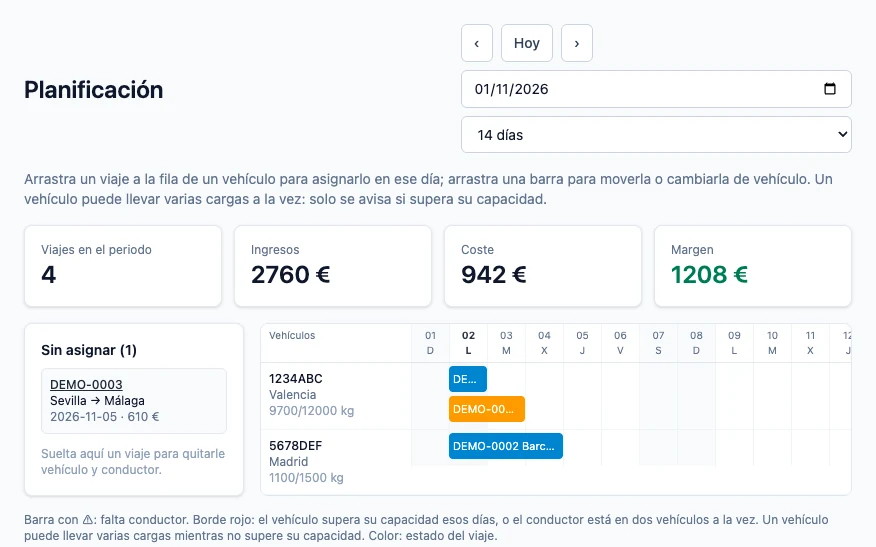
Visual trip planning
A per-vehicle, per-day chart: drag a trip to assign or reassign it. It detects overlaps, finds free vehicles and drivers, and calculates revenue, cost and margin per trip.
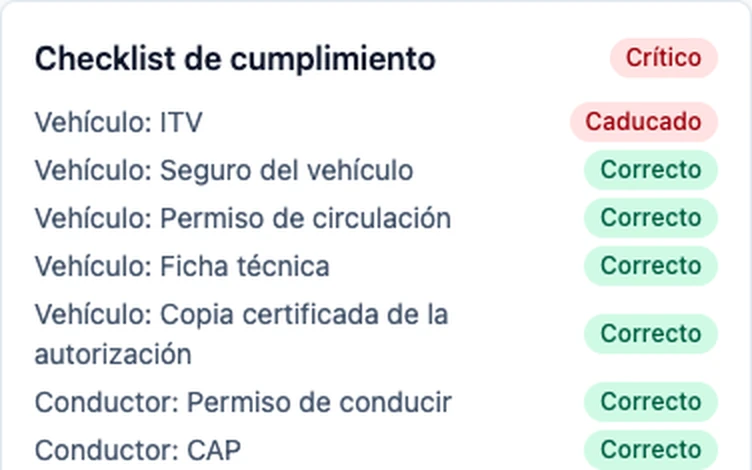
Compliance traffic light
Before every departure it checks authorization, insurance, vehicle inspection, tachograph calibration, permits, CAP and ADR. It tells you what is missing or expired and keeps a record of each departure with any issues.
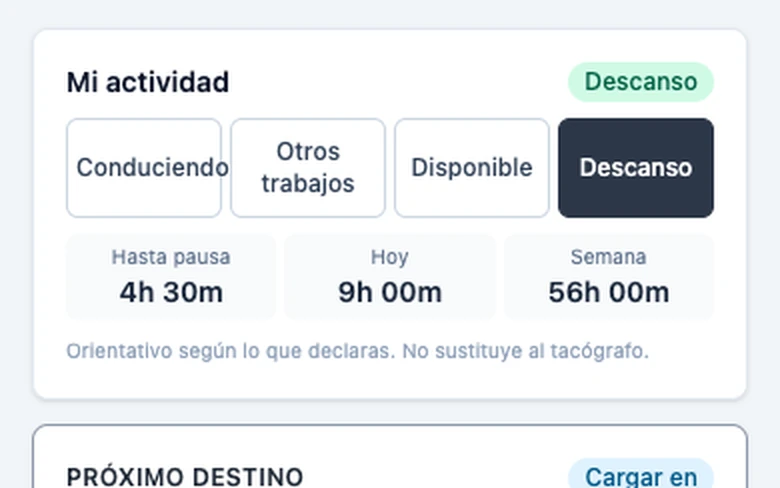
Driver app (PWA)
It opens from the browser, can be added to the home screen and works without coverage. The driver sees the next destination, the ordered stops and the route on the map.
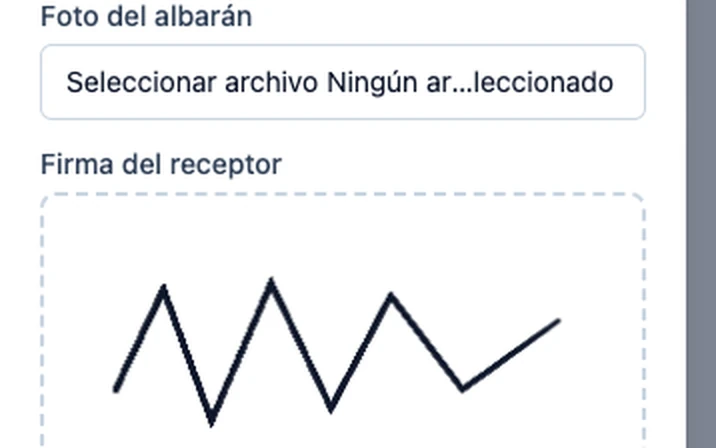
Digital delivery with photo and signature
A photo of the delivery note and the receiver's signature from the phone, synced when the connection returns. No more delivery notes lost in the glovebox.
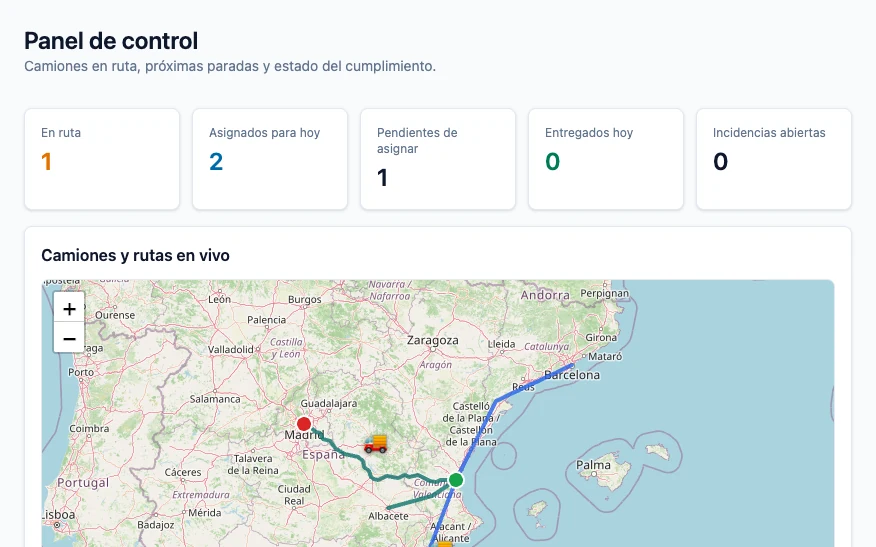
Routes and live map
Road route, distance and duration for each trip. On the home screen you see every truck, its active routes and the next destination.
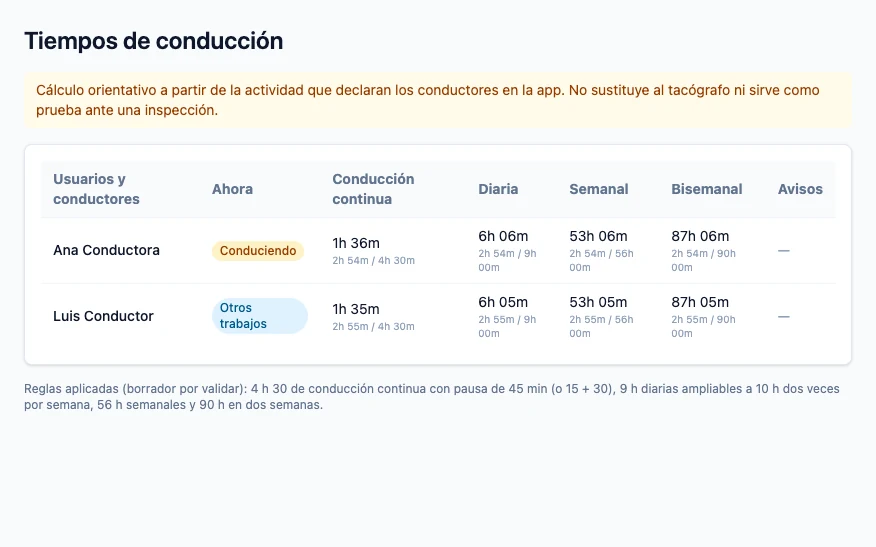
Driving times
Calculates how much time the driver has left under Regulation (EC) 561/2006 and warns before limits are exceeded. It is an aid: it does not replace the tachograph.
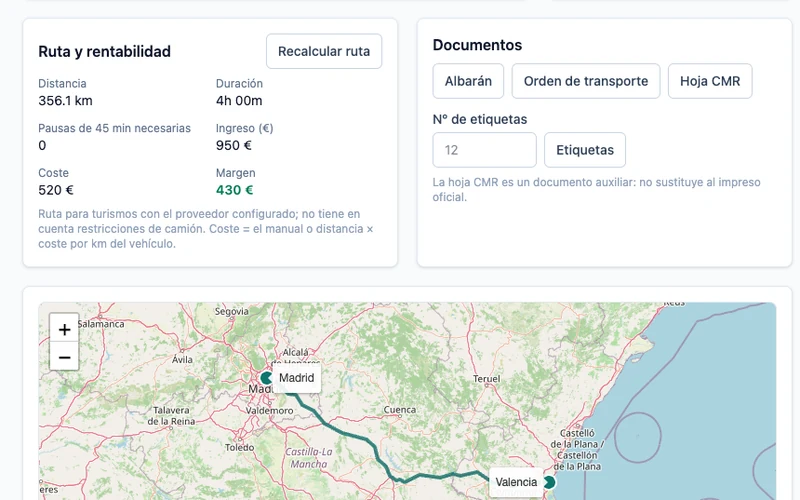
Transport documents in PDF
Delivery note, transport order, CMR-style document and parcel labels with a QR code, generated from the trip itself.
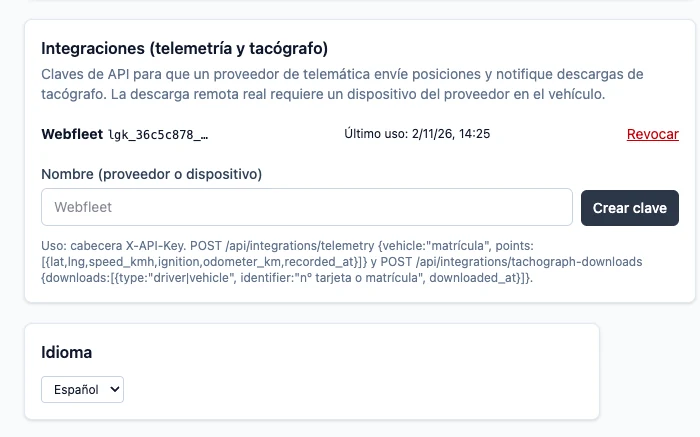
Telematics integration
A per-company API key to receive tachograph downloads and telemetry (position, speed, mileage) from device providers.
Real Fleetaria screenshots with sample data.
How it works
Set up your company
Register vehicles, drivers and clients, and upload documents with their expiry date. Each company works isolated from the others.
Plan and assign
Create trips and assign them on the chart. Fleetaria calculates the route by itself and warns you of overlaps or when a vehicle is over capacity.
The driver executes
They see their next destination, log their activity and close the delivery with a photo and signature. You see it in the panel as soon as there is a connection.
Legal compliance without chasing paperwork
The compliance module is based on Order FOM/2861/2012 (control document) and on what is checked at a roadside inspection. For each trip it verifies:
- Company: transport authorization, insurance and, with a heavy-vehicle authorization (MDP), a transport manager with a certificate of professional competence (CCP).
- Vehicle: vehicle inspection (ITV), insurance, registration, technical sheet, tachograph calibration and, with dangerous goods, ADR certificate.
- Driver: a licence class sufficient for the vehicle, CAP, tachograph card and, with dangerous goods, ADR card.
- Trip: shipper, consignee and goods details, UN number and ADR class where applicable, CMR consignment note for international transport, and issuance of the control document.
- Warnings: financial capacity (MDP) and tachograph downloads about to expire (28 days for the driver card and 90 days for the vehicle unit).
Fleetaria helps you comply with the rules but does not replace legal advice. The requirements are being validated with a transport adviser, and the traffic light informs and keeps a record: by default the driver confirms and leaves, and each company can configure that only a manager authorizes departures with issues.
Fleetaria vs. spreadsheets and messaging
It is where most small fleets start. This is what changes when you move to a TMS.
| Need | Excel + WhatsApp | Fleetaria |
|---|---|---|
| Assigning trips and seeing overlaps | Manual; mistakes are found late | Per-vehicle, per-day chart with overlap warnings |
| Expiry of inspections, insurance, CAP and ADR | Depends on someone remembering | Traffic light per trip and documents with expiry dates |
| Proof of delivery | A loose photo on the driver's phone | Photo and signature linked to the trip, also offline |
| Control document | Filled in by hand or from a template | Checked as issued before departure |
| Profitability per trip | Calculated separately, when there is time | Revenue, cost and margin in the planning view |
| Several people working at once | Duplicate versions and endless chats | Administrator, manager and driver roles |
What it does and does not do yet
We would rather you know before the demo:
- Invoicing is limited to internal invoices (not VeriFactu-certified yet), with no automatic profitability per client.
- It does not send email or push notifications; expiry warnings are shown inside the application.
- It does not read tachograph (.ddd) files nor replace the tachograph: time control is based on what the driver declares.
- It does not include eCMR or a freight exchange.
- GPS tracking from the app only records positions while the app is open; continuous tracking needs a device in the vehicle connected through the API.
Frequently asked questions
What is TMS software for road transport?
A TMS (Transport Management System) is the program a transport company uses to plan and control its trips, vehicles, drivers and paperwork. In a small fleet it replaces spreadsheets, messaging groups and folders of paper.
Is Fleetaria suitable for an owner-driver with a single truck?
Yes. It is designed for hauliers from 1 up to around 20 vehicles. An owner-driver mainly uses document control, digital delivery and the control document.
Does Fleetaria comply with Spanish transport regulations?
It helps you comply: before each trip it checks the documents and data reviewed at a roadside inspection, based on Order FOM/2861/2012 and other rules. The requirements are being validated with a transport adviser and the tool does not replace legal advice.
Do drivers have to install anything?
No app store is needed. The driver app is a PWA: it opens from the phone's browser, can be added to the home screen and keeps working without coverage, syncing afterwards.
Does it replace the tachograph?
No. The tachograph remains the legal record. Fleetaria logs the activity the driver declares to calculate their remaining time and warn them, and tracks download dates, but it does not read tachograph files.
Can I see where my trucks are?
Yes. The panel shows the map with trucks and their active routes. The driver app records the position while it is open; for continuous tracking, a telematics device is connected through the API.
Does it include invoicing?
Basic internal invoicing: sequential numbering, VAT and payment tracking. It is not VeriFactu-certified yet, so check the format with your tax adviser before using it as a legal invoice.
Is my data kept separate from other companies'?
Yes. Fleetaria is multi-company: each company sees only its own data, and within it there are administrator, manager and driver roles with different permissions.
How much does it cost?
Request a demo and we will send you the current terms for the size of your fleet.
Guides for hauliers
Regulation and fleet management explained plainly, with links to official sources.
Driving and rest times (Regulation 561/2006): limits and how to control them
Practical summary of Regulation (EC) 561/2006: 9 hours daily, 56 weekly, 45-minute break and rest periods. Table of limits and how not to exceed them.
3 min readOperationsDigital proof of delivery (POD): delivery note, photo and signature from the phone
How digital proof of delivery works in transport: photo of the delivery note, receiver's signature and sync without coverage. Benefits and requirements for it to hold up in a claim.
2 min readOperationsRoute and trip planning for a small fleet: method and mistakes to avoid
How to plan trips and routes with 1 to 20 vehicles: visual assignment, capacity, driving times, multi-load and margin per trip.
3 min readComplianceDangerous goods (ADR): documents the driver and vehicle must carry
What the ADR requires for road transport of dangerous goods: driver card, vehicle certificate, UN number, class and consignment note. Pre-departure checklist.
2 min readSoftwareBest transport management software (TMS) for small fleets and owner-drivers in Spain
How to choose TMS software if you have between 1 and 20 vehicles: criteria, demo questions, common mistakes and where Fleetaria fits.
4 min readComplianceDocuments a transport company must keep up to date: expiry checklist
Checklist of company, vehicle and driver documents checked at a roadside inspection: vehicle inspection, insurance, authorization, CAP, tachograph, ADR. How to avoid expiries.
3 min readGet your transport operations in order
Planning, driver app and document control in a single tool. We will show you Fleetaria with a case like yours.